Menu

Explorer & Settings

Tempo Explorer Submit Project
🌐 HTTP Status Code

HTTP 402 — Payment Required

The status code that was reserved for 30+ years and finally has a real use. What it means, where you'll see it, and how x402 brings it to life.

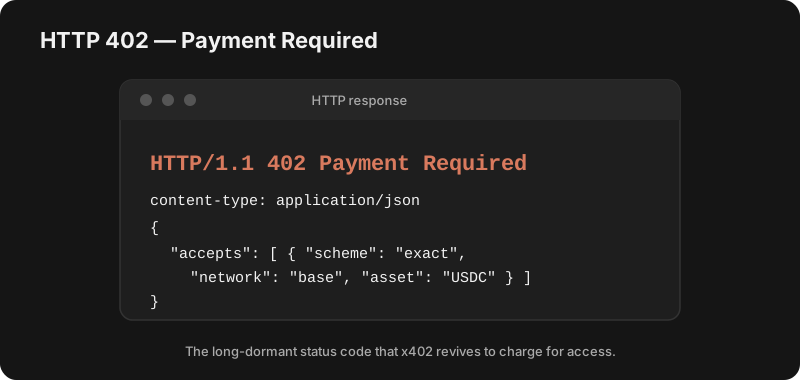
Example HTTP 402 Payment Required response, showing the status line and a JSON body listing the accepted payment scheme, network (Base) and asset (USDC)

What it means

402 Payment Required tells the client: this resource exists, but you must pay before you can have it. It sits in the 4xx family alongside 401 Unauthorized and 403 Forbidden — but unlike those, 402 isn't about who you are, it's about whether you've paid.

Why it sat unused for decades

When HTTP was written in the early 1990s, the web had no native money layer — no instant, programmatic way to move value between two machines. So 402 was reserved for future use and left without a standard behavior. For years it was a curiosity: a status code everyone knew about but almost nobody could actually use, because there was no agreed-upon way for a client to respond to it.

Where you actually hit a 402 today

Because there was no standard, individual services invented their own meanings. If you've seen a 402, it was probably one of these:

Stripe
Returned when a payment fails or a charge is declined during an API call.
npm / GitHub Packages
Seen when a private package or registry requires a paid plan or billing to be set up.
Cloudflare
Used by some Cloudflare features and Workers to signal that payment or a higher plan is required.
Vercel
Surfaces when a project hits a usage limit on a plan that requires upgrading to continue.
nginx / API gateways
Can be configured to return 402 for quota-exceeded or unpaid clients.

How x402 finally gives it meaning

The x402 protocol standardizes the whole exchange. Instead of a dead-end, a 402 now carries machine-readable payment terms:

  1. Client requests a paid resource → server replies 402 with the price, asset (e.g. USDC) and where to pay.
  2. Client pays on-chain and retries the request with proof of payment.
  3. Server verifies and returns the resource — no signup, no API key, no human.

That makes 402 a real, automated paywall — perfect for APIs and AI agents that need to pay each other on the fly. See what is x402, the x402 SDKs, or browse the 1.1k x402 projects we track.

Frequently asked questions

What does HTTP 402 Payment Required mean?

HTTP 402 Payment Required is an HTTP status code that signals the client must pay before the request can be fulfilled. It was reserved in the original HTTP specification for future use in digital payment systems, but for decades had no standard meaning — so different services used it in their own non-standard ways.

Why was HTTP 402 unused for so long?

When HTTP was designed in the early 1990s, there was no native way to settle a payment on the web — no instant, programmatic money transfer. So 402 was reserved as a placeholder. Browsers and servers never agreed on what a client should do when it received one, so it stayed largely dormant.

Is HTTP 402 an error?

Technically it is a 4xx client status, but it is not an error in the usual sense — it is not saying your request was malformed. It means "this resource is available, but you need to pay for it first." With modern protocols the response also tells the client how to pay.

How does x402 use HTTP 402?

x402 is an open protocol that finally gives 402 a standard meaning. A server returns 402 with machine-readable payment terms (amount, asset, address); the client pays in stablecoins (e.g. USDC) and retries with proof of payment, and the server fulfills the request. It turns 402 into a real, automated paywall for APIs and AI agents. We track 1.1k x402 projects.

What is the difference between 401, 402 and 403?

401 Unauthorized means you need to authenticate (log in). 403 Forbidden means you are authenticated but not allowed. 402 Payment Required means access is gated behind a payment — you can proceed once you pay.