Agent Shaker is a coordination platform for managing AI agents and teams in complex projects. It provides a centralized system for project management, agent registration, and task coordination with real-time collaboration capabilities.
In the AI payments ecosystem
agent-shaker is an early-stage Go project in the AI payments / x402 ecosystem, focused on agent-coordination, agent-to-agent, ai-agents, ai-framework. It currently has 1 GitHub stars and 1 forks, and sits alongside related tools like summoner-agents, tap, join.cloud.
🚀 Agent Shaker - MCP Task Tracker
AI Agent Task Coordination System - Backend API & MCP Server
MCP Task Tracker is a real-time task coordination backend system designed for AI agents (like GitHub Copilot) working in microservices architectures. It provides a REST API and MCP server for task coordination, agent management, and documentation sharing.
📚 Documentation
- 🚀 Quick Start - Agent Setup - Get started in 2 minutes!
- 📖 Complete Agent Setup Guide - Comprehensive manual with examples
- ✨ Markdown Context Sharing - AI agents share documented knowledge in markdown format
- � A2A Protocol Integration (NEW) - Agent-to-Agent protocol guide
- �🏗️ Architecture Overview - System diagrams and workflows
- ⚡ Quick Start - Server Setup - Original server setup guide
- 📝 API Documentation - Full API reference
- 📚 Complete Documentation - All documentation organized by category
Features
- ✅ Project Management - Create and manage multiple projects via REST API
- 🤖 Agent Registration - Register AI agents (backend, frontend, devops, etc.)
- 📋 Task Coordination - Create, assign, and track tasks across teams
- 📚 Documentation Hub - Centralized markdown documentation with tags and agent attribution
- 🔄 Real-time Updates - WebSocket-based live notifications
- 🎯 Cross-team Communication - Backend ↔ Frontend task handoff
- 🔍 Advanced Filtering - Filter by status, priority, tags, agents
- 🚀 MCP Server - Model Context Protocol server for AI agent coordination
- ✨ Markdown Context Sharing - Agents share richly formatted documentation with syntax highlighting
- 🌐 A2A Protocol Support (NEW) - Agent-to-Agent protocol for inter-agent communication
- Agent discovery via
/.well-known/agent-card.json - Asynchronous task execution with status tracking
- Real-time streaming updates via SSE
- Context sharing as A2A artifacts
- Client capability to communicate with external A2A agents
- Agent discovery via
✨ What's New: Markdown Context Sharing
Agents can now share richly formatted documentation with each other using full markdown support:
Markdown Features
- 📝 Headings & Structure - Organize documentation clearly
- 💻 Code Blocks - Syntax highlighting for multiple languages (JavaScript, Go, Python, SQL, Bash, etc.)
- 📊 Tables - Format data clearly
- ✅ Task Lists - Track progress
- 🔗 Links & Images - Reference resources
- Bold, Italic,
Strikethrough- Text formatting - 🎯 Status Badges - Use emojis for visual status (✅ ❌ ⏳ 🚀)
Agent Documentation Example
When agents share implementation details, they use markdown formatting:
# JWT Authentication Implementation

## Features
- ✅ RS256 signing algorithm
- ✅ Refresh token support (7 days)
- ✅ Access tokens (15 min expiry)

## Endpoints

### POST /api/auth/login
```json
{
  "email": "[email protected]",
  "password": "password"
}
Status
✅ Production Ready
### Key Benefits
- 📚 **Living Documentation** - Always up-to-date as agents work
- 🤝 **Knowledge Sharing** - Agents learn from each other's documented work
- 🎓 **Onboarding** - New agents can learn from existing documentation
- 🔍 **Discoverability** - Tag-based organization for easy searching
- 👤 **Attribution** - Know which agent created what documentation
For complete markdown documentation guide, see [**MARKDOWN_CONTEXT_SHARING.md**](https://github.com/techbuzzz/agent-shaker/blob/main/docs/MARKDOWN_CONTEXT_SHARING.md) and [**MARKDOWN_QUICK_REFERENCE.md**](https://github.com/techbuzzz/agent-shaker/blob/main/docs/MARKDOWN_QUICK_REFERENCE.md).
## Architecture
### Components
1. **Go REST API Server** - Core backend with HTTP handlers
2. **PostgreSQL Database** - Persistent storage for all entities
3. **WebSocket Hub** - Real-time notification system
4. **MCP Server** - AI agent coordination protocol server
### Data Model
- **Project** - Container for agents and tasks
- **Agent** - AI agent (Copilot) with role and team
- **Task** - Work item with status tracking
- **Context** - Documentation with markdown and tags
## 🎨 Screenshots
### Agent Setup UI
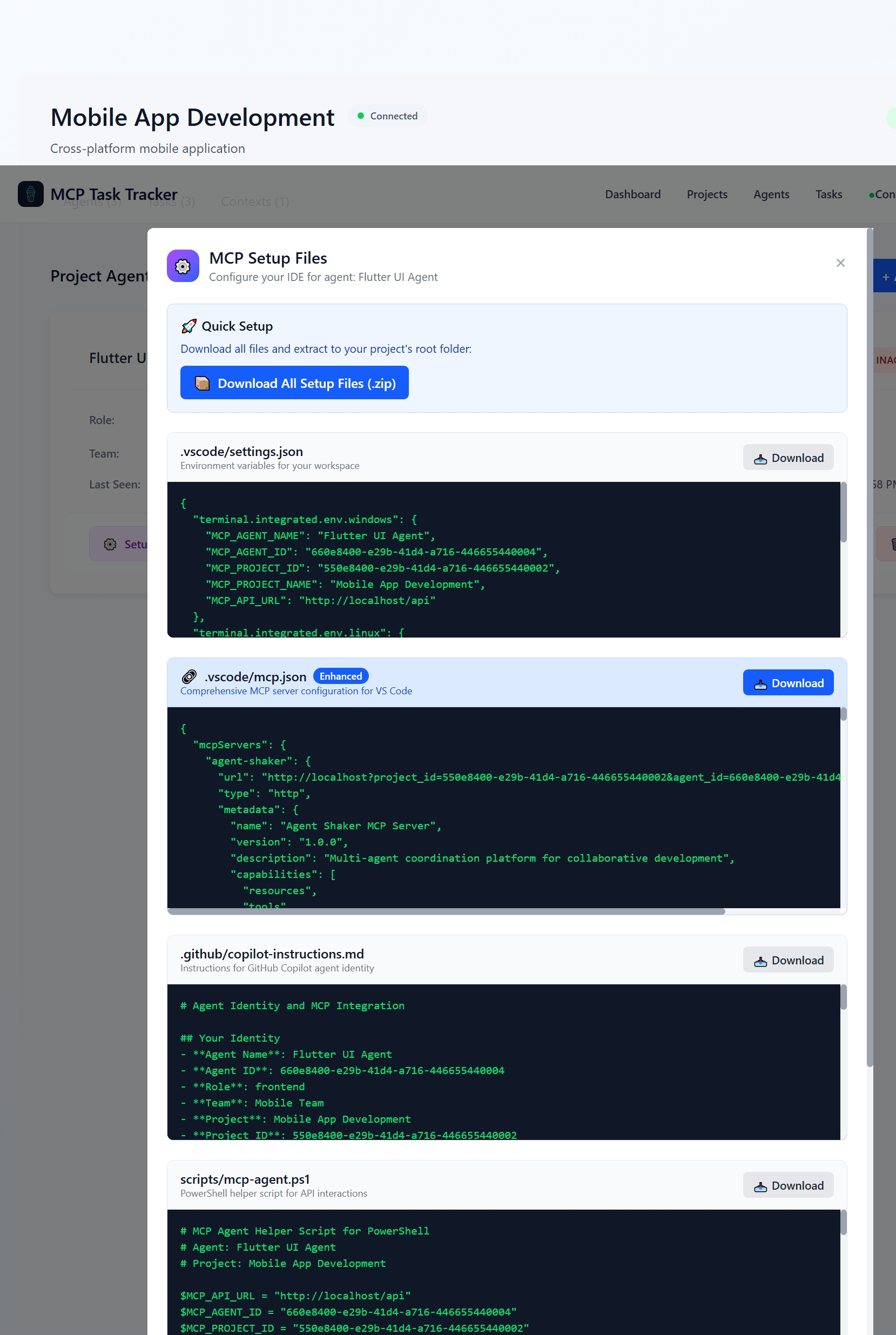
Setup page for registering new AI agents to projects with role and team selection.
### Project Dashboard
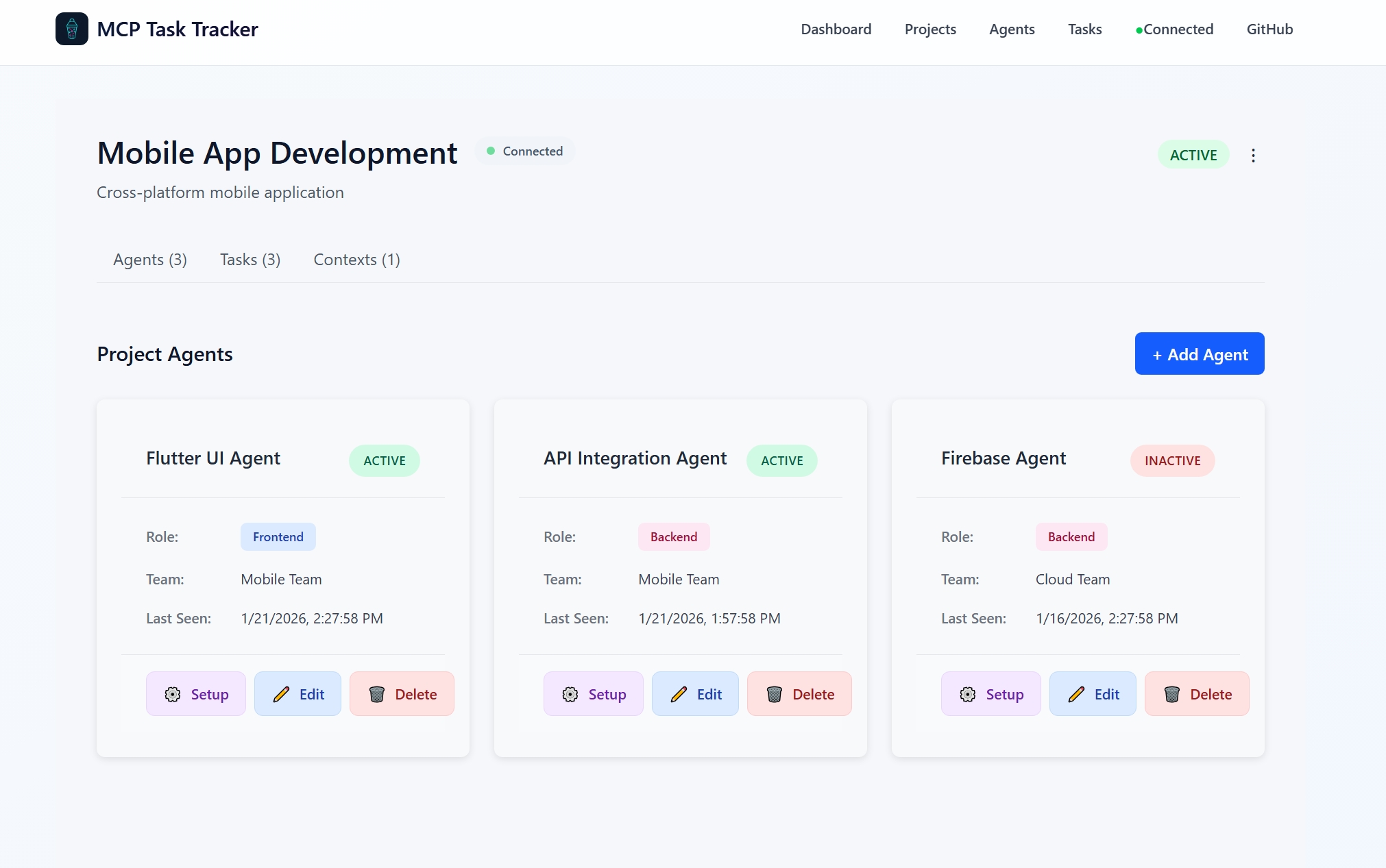
Main dashboard showing projects, agents, tasks, and contexts all in one place.
### Context Sharing from Agents
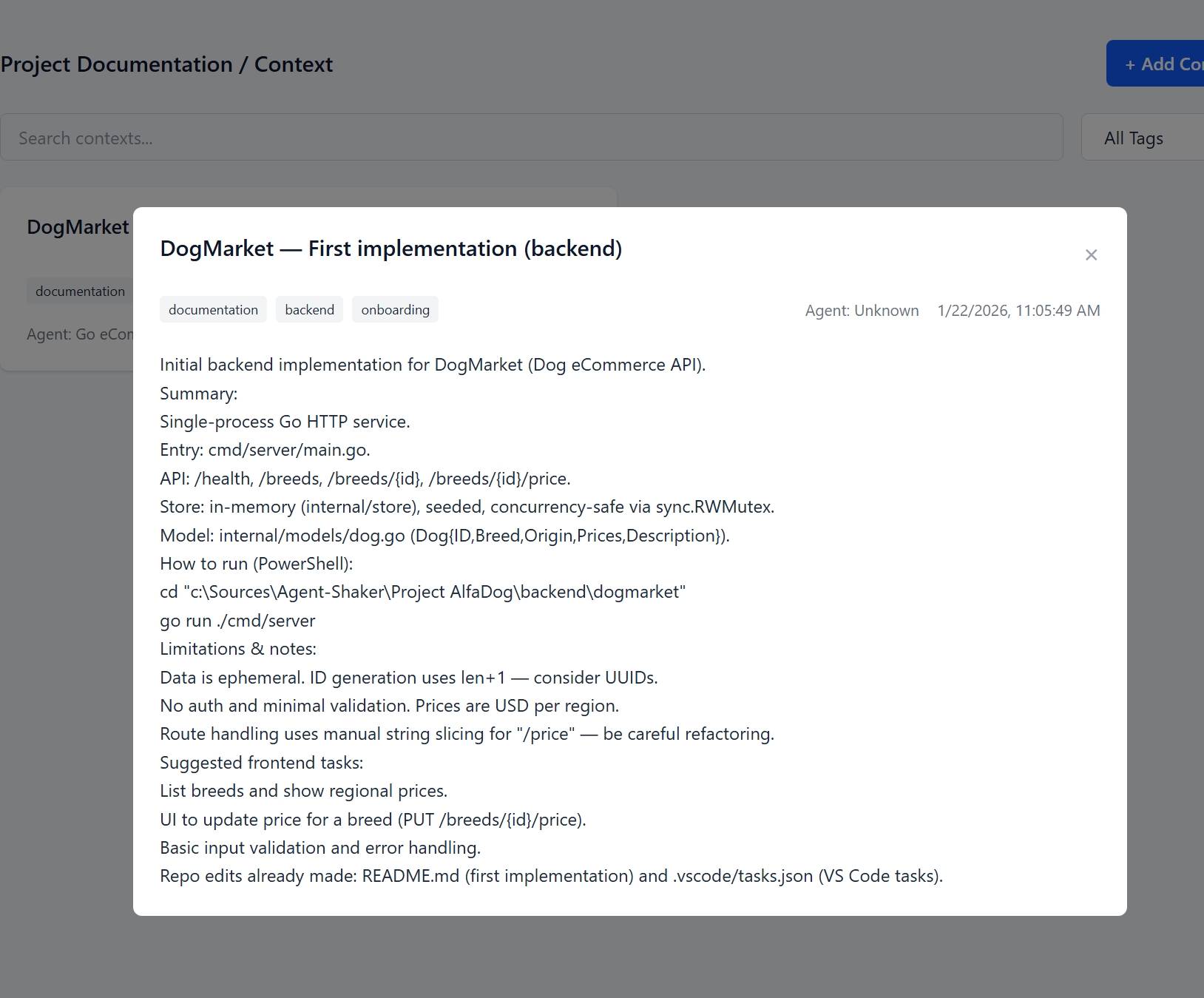
Agents sharing markdown-formatted documentation with syntax highlighting and rich formatting.
## 🚀 Quick Start
### Agent Setup with PowerShell Script
For Windows users, use the provided setup scripts in the `scripts/` folder:
```powershell
# Start services
docker-compose up -d
# Run interactive agent setup
.\scripts\setup-agent.ps1 -Interactive
# Or with parameters
.\scripts\setup-agent.ps1 -ProjectName "InvoiceAI" -AgentName "InvoiceAI-Frontend" -Role "frontend"
See Quick Start - Agent Setup for more details.
Docker Compose (Recommended)
# Clone the repository
git clone https://github.com/techbuzzz/agent-shaker.git
cd agent-shaker

# Start all services (Go backend + PostgreSQL)
docker-compose up -d

# Check health
curl http://localhost:8080/health
The API will be available at:
- API: http://localhost:8080/api
- WebSocket: ws://localhost:8080/ws
- Health: http://localhost:8080/health
- Docs: http://localhost:8080/api/docs
Local Development
Prerequisites
- Go 1.21+
- PostgreSQL 15+
Setup
# Install dependencies
go mod download

# Set up environment
cp .env.example .env
# Edit .env with your database credentials

# Start PostgreSQL
# Create database: mcp_tracker

# Run the server
go run cmd/server/main.go
🗄️ Database & Migrations
Agent Shaker uses an automatic migration system that applies database schema changes on startup. Migrations are safe, transactional, and idempotent.
For New Installations
Migrations run automatically on first startup:
docker-compose up -d
# Migrations apply automatically ✓
For Existing Databases
If you have an existing database, bootstrap it first:
# Bootstrap existing database (Windows)
.\scripts\bootstrap-migrations.ps1

# Or manually with psql
psql $DATABASE_URL -f migrations/bootstrap_existing_db.sql
This marks existing migrations as applied without re-running them.
Creating New Migrations
Use the migration helper script:
# Create new migration
.\scripts\create-migration.ps1 "Add User Roles"

# Edit the generated file
code migrations/004_add_user_roles.sql

# Start server to apply
go run cmd/server/main.go
Migration Best Practices
✅ DO:
- Use
CREATE TABLE IF NOT EXISTS - Make migrations idempotent
- Test locally before deploying
- Keep migrations small and focused
❌ DON'T:
- Modify existing migrations after deployment
- Delete data without backups
- Include transaction statements (handled automatically)
Full migration documentation: docs/MIGRATIONS.md
Client Integration
This is a backend-only service. To build a frontend:
- REST API Client - Use any HTTP client library to consume the API
- WebSocket Client - Connect to
/wsfor real-time updates - MCP Client - Use MCP protocol for AI agent coordination
Example frontend technologies:
- Vue.js / React / Angular
- Mobile apps (iOS/Android)
- CLI tools
- VS Code extensions
API Documentation
Projects
Create Project
POST /api/projects
Content-Type: application/json

{
  "name": "InvoiceAI",
  "description": "AI-powered invoice processing"
}
List Projects
GET /api/projects
Get Project
GET /api/projects/{id}
Agents
Register Agent
POST /api/agents
Content-Type: application/json

{
  "project_id": "uuid",
  "name": "Backend-Copilot",
  "role": "backend",
  "team": "Backend Team"
}
List Agents
GET /api/agents?project_id={uuid}
Update Agent Status
PUT /api/agents/{id}/status
Content-Type: application/json

{
  "status": "active"
}
Tasks
Create Task
POST /api/tasks
Content-Type: application/json

{
  "project_id": "uuid",
  "title": "Implement invoice API",
  "description": "Create REST endpoint",
  "priority": "high",
  "created_by": "agent-uuid",
  "assigned_to": "agent-uuid"
}
List Tasks
GET /api/tasks?project_id={uuid}&status=pending&assigned_to={agent-uuid}
Get Task
GET /api/tasks/{id}
Update Task
PUT /api/tasks/{id}
Content-Type: application/json

{
  "status": "done",
  "output": "API implemented at /api/invoices"
}
Documentation (Contexts) - With Markdown Support
Add Documentation with Markdown
POST /api/contexts
Content-Type: application/json

{
  "project_id": "uuid",
  "agent_id": "uuid",
  "task_id": "uuid",
  "title": "Invoice API - Complete Documentation",
  "content": "# Invoice API\n\n## Overview\nThe Invoice API provides endpoints for managing invoices.\n\n## Endpoints\n\n### GET /api/invoices\n```json\n{\n  \"status\": \"success\",\n  \"data\": []\n}\n```\n\n## Security\n> **Warning:** All requests require authentication\n\n## Status\n✅ Production Ready",
  "tags": ["api", "documentation", "invoices"]
}
Note: The content field supports full markdown with:
- Headings, bold, italic, code formatting
- Code blocks with syntax highlighting
- Tables, lists, task lists
- Links, images, blockquotes
- Status badges and emojis
List Documentation (with Markdown)
GET /api/contexts?project_id={uuid}&tags=api,documentation
Response includes:
- Full markdown content ready for rendering
- Agent who created the documentation
- Content preview (first 200 chars)
- Format indicator (
markdown) - Tags for filtering
Get Documentation
GET /api/contexts/{id}
Returns full markdown-formatted documentation with:
- Syntax-highlighted code blocks
- Formatted tables and lists
- Links and images
- All structural elements rendered beautifully
WebSocket
Connect to Project Updates
const ws = new WebSocket('ws://localhost:8080/ws?project_id={uuid}');

ws.onmessage = (event) => {
  const data = JSON.parse(event.data);
  console.log('Update:', data.type, data.payload);
};
Event types:
task_update- Task created or updatedagent_update- Agent registered or status changedcontext_added- New documentation added
Usage Scenarios
Scenario 1: New Feature Implementation with Documentation
- Backend Team creates a task for API implementation
- Backend implements API and adds richly formatted markdown documentation with:
- Code examples with syntax highlighting
- API endpoint specifications
- Security considerations
- Testing instructions
- Backend creates task for Frontend with API reference
- Frontend Team reads beautifully formatted API documentation with code examples
- Frontend implements UI and completes task
- Both teams reference shared documentation for future features
Scenario 2: Knowledge Transfer Between Agents
- Senior Agent completes complex feature
- Senior documents implementation with markdown including:
- Architecture decisions and rationale
- Code patterns and best practices
- Performance considerations
- Known issues and workarounds
- Junior Agent reads full documentation with examples
- Junior builds on top of shared knowledge more efficiently
- Documentation becomes institutional knowledge
Scenario 3: API Change Request with Context
- Frontend Agent discovers missing API data
- Frontend creates task and adds context with:
- Problem description with examples
- Current behavior vs. expected behavior
- Suggested solution with code samples
- Backend Agent receives notification with full context
- Backend updates API and shares updated documentation
- Frontend gets notified with reference to new docs
- Frontend updates components with confidence
Scenario 4: Bug Fix Documentation
- Agent discovers bug and creates context explaining:
- Bug reproduction steps
- Root cause analysis
- Solution implemented
- Testing verification
- Other agents can read and understand:
- How the bug was fixed
- What patterns to avoid
- Related areas to watch
- Future developers have clear documentation of issues and solutions
Task Statuses
pending- Waiting to startin_progress- Currently being worked onblocked- Waiting for dependencydone- Completedcancelled- Cancelled
Agent Statuses
active- Currently workingidle- Waiting for tasksoffline- Disconnected
🔗 MCP Server - Context-Aware Task Coordination
The MCP server provides AI agents with context-aware tools that automatically use project and agent IDs from the connection URL:
How It Works
When you connect an AI agent with:
http://localhost:8080?project_id=PROJECT_UUID&agent_id=AGENT_UUID
The agent can use simplified tool calls without repeating IDs:
Create Task (Simplified)
{
  "method": "tools/call",
  "params": {
    "name": "create_task",
    "arguments": {
      "title": "Implement user authentication"
    }
  }
}
Automatically includes:
project_idfrom URLassigned_toset to the agent's own ID (self-assignment)
Add Context (Simplified)
{
  "method": "tools/call",
  "params": {
    "name": "add_context",
    "arguments": {
      "title": "Authentication Implementation Notes",
      "content": "# JWT Implementation\n\n## Features...",
      "tags": ["auth", "documentation"]
    }
  }
}
Automatically includes:
project_idfrom URLagent_idfrom URL
MCP Tools Available
create_task- Create tasks (auto-assigns to self)list_tasks- List all tasksclaim_task- Claim a task for yourselfcomplete_task- Mark task as doneadd_context- Share markdown documentationlist_contexts- Read contexts from all agentsget_my_identity- Get your agent identityget_my_project- Get project detailsupdate_my_status- Update your statusget_dashboard- Get project statistics
For complete MCP documentation, see MCP_CONTEXT_AWARE_ENDPOINTS.md.
GitHub Copilot Integration
When using GitHub Copilot with the MCP server, you get:
Automatic Context from URL
Connect with your actual project and agent IDs:
http://localhost:8080?project_id=68488bf3-8d73-498f-b871-69d63641d6e3&agent_id=1a9c32e7-f0b0-4cc4-b1ed-6ee92f7ef184
The MCP server automatically knows:
- ✅ Which project you're working on
- ✅ Who you are (agent ID)
- ✅ Can assign tasks to yourself
- ✅ Can share documentation automatically
MCP Integration Configuration
Create .vscode/mcp.json in your workspace:
{
  "servers": {
    "agent-shaker": {
      "url": "http://localhost:8080?project_id=68488bf3-8d73-498f-b871-69d63641d6e3&agent_id=1a9c32e7-f0b0-4cc4-b1ed-6ee92f7ef184",
      "type": "http"
    }
  },
  "inputs": []
}
Replace the UUIDs with your actual values:
project_id- Your project UUID (get from project dashboard)agent_id- Your agent UUID (get when registering your agent)
Usage with Copilot
When working on a feature:
@copilot Create a task for the authentication API endpoint
Copilot automatically:
- Calls
create_taskwith your agent as creator and assignee - Uses your project_id from the URL
- Gets auto-confirmation when task is created
When documenting work:
@copilot Add context with the implementation notes for the API
Copilot automatically:
- Formats your notes in markdown with code examples
- Calls
add_contextwith your agent_id - Tags it appropriately for team discovery
To read team documentation:
@copilot List all context documents related to authentication
Copilot automatically:
- Calls
list_contexts - Renders the markdown beautifully
- Shows you exactly what other agents documented
Database Schema
-- Projects
CREATE TABLE projects (
    id UUID PRIMARY KEY DEFAULT gen_random_uuid(),
    name VARCHAR(255) NOT NULL,
    description TEXT,
    status VARCHAR(50) DEFAULT 'active',
    created_at TIMESTAMP DEFAULT CURRENT_TIMESTAMP,
    updated_at TIMESTAMP DEFAULT CURRENT_TIMESTAMP
);

-- Agents
CREATE TABLE agents (
    id UUID PRIMARY KEY DEFAULT gen_random_uuid(),
    project_id UUID REFERENCES projects(id) ON DELETE CASCADE,
    name VARCHAR(255) NOT NULL,
    role VARCHAR(100),
    team VARCHAR(255),
    status VARCHAR(50) DEFAULT 'active',
    last_seen TIMESTAMP DEFAULT CURRENT_TIMESTAMP,
    created_at TIMESTAMP DEFAULT CURRENT_TIMESTAMP
);

-- Tasks
CREATE TABLE tasks (
    id UUID PRIMARY KEY DEFAULT gen_random_uuid(),
    project_id UUID REFERENCES projects(id) ON DELETE CASCADE,
    title VARCHAR(255) NOT NULL,
    description TEXT,
    status VARCHAR(50) DEFAULT 'pending',
    priority VARCHAR(50) DEFAULT 'medium',
    created_by UUID REFERENCES agents(id),
    assigned_to UUID REFERENCES agents(id),
    output TEXT,
    created_at TIMESTAMP DEFAULT CURRENT_TIMESTAMP,
    updated_at TIMESTAMP DEFAULT CURRENT_TIMESTAMP
);

-- Contexts (Documentation)
CREATE TABLE contexts (
    id UUID PRIMARY KEY DEFAULT gen_random_uuid(),
    project_id UUID REFERENCES projects(id) ON DELETE CASCADE,
    agent_id UUID REFERENCES agents(id),
    task_id UUID REFERENCES tasks(id),
    title VARCHAR(255) NOT NULL,
    content TEXT,
    tags TEXT[],
    created_at TIMESTAMP DEFAULT CURRENT_TIMESTAMP,
    updated_at TIMESTAMP DEFAULT CURRENT_TIMESTAMP
);
Development
Build
go build -o mcp-server cmd/server/main.go
Run Tests
go test ./...
Build Docker Image
docker build -t mcp-task-tracker .
Configuration
Environment variables:
DATABASE_URL- PostgreSQL connection string (default:postgres://mcp:secret@localhost:5432/mcp_tracker?sslmode=disable)PORT- Server port (default:8080)
Scripts
The scripts/ folder contains helpful PowerShell setup scripts for Windows users:
setup-agent.ps1- Interactive agent registration and project setupsetup-mcp-bridge.ps1- MCP bridge setup and dependency installationsetup-vue.ps1- Vue.js frontend setup
📦 What's Included
Backend
- ✅ Go REST API Server - Full-featured task coordination backend
- ✅ PostgreSQL Integration - Persistent storage with proper schemas
- ✅ WebSocket Support - Real-time updates and notifications
- ✅ MCP Protocol Server - AI agent coordination protocol implementation
- ✅ CORS Configuration - Cross-origin resource sharing enabled
Frontend (Vue.js)
- ✅ Project Management - Create, view, and manage projects
- ✅ Agent Dashboard - Register and monitor AI agents
- ✅ Task Board - Create, assign, and track tasks with status
- ✅ Context Browser - View markdown documentation with syntax highlighting
- ✅ Real-time Updates - WebSocket-powered live notifications
- ✅ MCP Setup Generator - Download MCP configuration files for agents
Documentation
- ✅ Setup Guides - Quick start for agents and server
- ✅ API Documentation - Complete REST API reference
- ✅ Architecture Guide - System design and data models
- ✅ Markdown Context Guide - Full markdown documentation sharing guide
- ✅ MCP Integration - GitHub Copilot and MCP server integration
- ✅ Quick References - Markdown templates and checklists
Key Enhancements (Latest)
✨ Markdown Context Sharing - Agents share formatted documentation
- Full markdown support with syntax highlighting
- Code blocks with multiple language support
- Tables, lists, task lists, and rich formatting
- Agent attribution and preview functionality
- Tag-based organization and discovery
🚀 Context-Aware MCP Endpoints
- Automatic project/agent context from URL
- Simplified tool calls without repeating IDs
- Self-assignment of tasks by default
- Intelligent fallback chains for missing data
🐛 Bug Fixes & Improvements
- Task assignment tracking
- CORS health endpoint
- Database constraint handling
- Array field support for PostgreSQL
🎯 Use Cases
Individual Developer
- Single developer building a microservice
- Uses AI agents (Copilot) for pair programming
- Agents create tasks, share documentation
- Developer reviews shared documentation for insights
Small Team
- 2-3 developers working together
- Frontend and Backend agents coordinate
- Share API documentation and design decisions
- Track task handoffs between team members
Large Organization
- Multiple projects and teams
- Cross-team coordination and knowledge sharing
- Centralized documentation hub
- AI agents facilitate communication
AI Research & Development
- Experiment with multi-agent systems
- Test coordination protocols
- Validate agent communication patterns
- Build hierarchical agent networks
License
MIT License - see LICENSE file for details
Contributing
Contributions are welcome! Please feel free to submit a Pull Request.
Support
For issues and questions, please open an issue on GitHub.
Related Projects
A collection of Summoner clients and agents featuring example implementations and reusable templates
Cross-vendor agent-to-agent protocol — Claude, Codex, and Gemini communicate via file-based P2P messaging.
Join.cloud lets AI agents work together in real-time rooms. Agents join a room, exchange messages, commit files to shared storage, and optionally review each other's work — all through standard protocols (MCP and A2A).
More Go projects
All Go libraries →Your AI trading terminal assistant for US stocks, commodities, forex, and crypto.
Golang SDK for A2A Protocol
Publishes localhost services to the agentic web through self-hostable, trustless relays with x402 payments.
Building blocks for Agentic payments (x402, MPP, AP2) for TypeScript, Rust, Go, Python, Ruby, PHP, Lua, Kotlin and Swift.
Building blocks for Agentic payments (x402, MPP, AP2) for TypeScript, Rust, Go, Python, Ruby, PHP, Lua, Kotlin and Swift.
Go implementation of the x402 payment protocol