
x402-hono-seller-buyer-example
A self-contained demo for the x402 protocol (seller & buyer) built with Hono.
In the AI payments ecosystem
x402-hono-seller-buyer-example is an early-stage TypeScript project in the AI payments / x402 ecosystem, focused on base, hono, solana, x402. It currently has 1 GitHub stars and 0 forks, and sits alongside related tools like tdm-sdk, APITOLL, x402-sdk, pay-kit, mpp-sdk, x402-deploy.
Hono x402 Seller & Buyer Test Environment

This is a self-contained test environment built with Hono to demonstrate and experiment with the x402 Protocol. This project helps you test USDC payments on the Base, Base Sepolia, and Solana Devnet networks, utilizing the facilitator from payai.network.
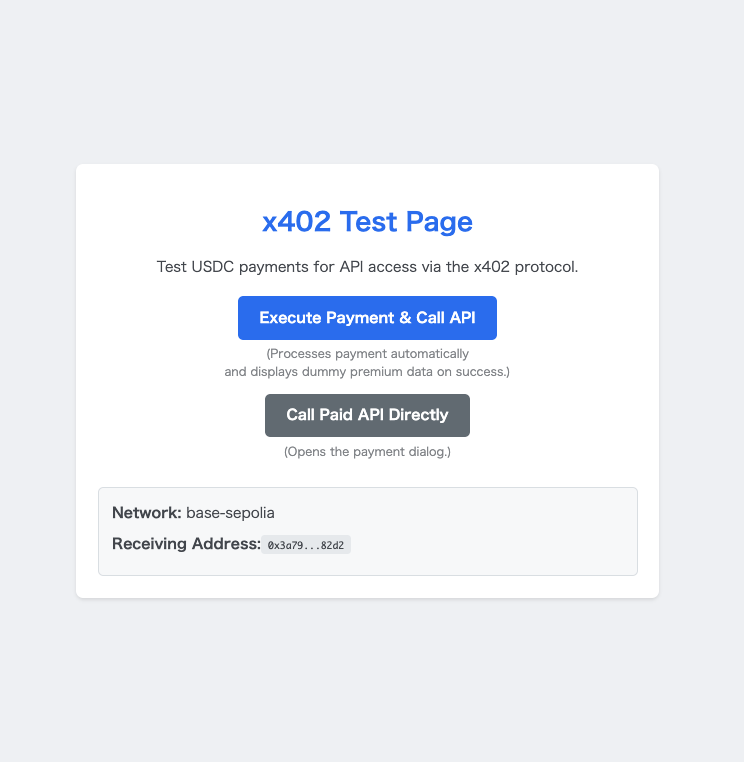
The project simulates both a "seller" and a "buyer" within a single server instance:
- Seller: A paid API endpoint (
/api/premium) protected by thex402-honomiddleware. - Buyer: A client API endpoint (
/client/call-premium) that usesx402-fetchto automatically handle the payment flow and access the paid content. - Facilitator: Utilizes the service from payai.network to provide payment details to the client.
Tip: This project also works with a self-hostable facilitator: snc2work/x402-facilitator-hono. Try it if you want to learn how the facilitator side works. The "Tips for Buyers" section in that repository may also be helpful for Solana mainnet configurations.
It includes a simple web interface to easily test both scenarios.
Prerequisites
- Node.js (v18 or later recommended)
- Yarn
- A test wallet with a private key and some testnet funds (e.g., Base Sepolia ETH/USDC).
Getting Started
Follow these steps to get the project running on your local machine.
1. Clone the repository
git clone https://github.com/snc2work/x402-hono-seller-buyer-example.git
cd x402-hono-seller-buyer-example
2. Install dependencies
yarn install
3. Set up environment variables
Copy the sample environment file and fill in your details.
cp .env.sample .env
Now, open the .env file and set the following variables:
PAY_TO_ADDRESS: The wallet address that will receive payments.NETWORK: The blockchain network to use (e.g.,base-sepolia).PRIVATE_KEY: The private key of the test/burner wallet that will make payments. Do not use a wallet with real funds!
4. Run the server
yarn dev
The server will start on http://localhost:8787.
Usage
Open your web browser and navigate to
http://localhost:8787.You will see two buttons on the test page:
Execute Payment & Call API: This calls the
/client/call-premiumendpoint. It will automatically perform the blockchain payment and, upon success, display the fetched dummy data in a new tab.Call Paid API Directly: This button calls the
/api/premiumendpoint directly. Since no payment has been made, this will trigger the x402 payment UI, prompting you to connect a wallet.
Environment Variables
| Variable | Description | Example |
|---|---|---|
PAY_TO_ADDRESS |
The address to receive payments. | 0xAbc... or 5xYz... |
NETWORK |
The blockchain network to use. Supported: base-sepolia, base, solana-devnet. |
base-sepolia |
FACILITATOR_URL |
The x402 facilitator service URL. | https://facilitator.http402.xyz |
PRIVATE_KEY |
Private key of a burner wallet for making payments. | 0x123... or a Base58 string |
RESOURCE_SERVER_URL |
The base URL of this server for internal calls. | http://localhost:8787 |
ENDPOINT_PATH |
The path of the paid API endpoint. | /api/premium |
Version Information
This project was built and tested with the following library versions:
x402-fetch:^0.7.0x402-hono:^0.7.1
Please be aware that future updates to these libraries may introduce breaking changes.
License
This project is licensed under the MIT License.
Similar projects


Open contract-facing SDK for payable routes and gateway-backed integrations. Thin public surface for authorize, checkout, and session flows.


The commerce layer for the x402 agent economy — micropayments for AI agents on Base and Solana


x402 SDK for AI agent payments - Base & Solana USDC micropayments


Building blocks for Agentic payments (x402, MPP, AP2) for TypeScript, Rust, Go, Python, Ruby, PHP, Lua, Kotlin and Swift.

Building blocks for Agentic payments (x402, MPP, AP2) for TypeScript, Rust, Go, Python, Ruby, PHP, Lua, Kotlin and Swift.

Turn any API or MCP server into a paid service with x402

More Solana projects
All Solana projects →
Open Source AI trading agent that operates autonomously across 1000+ markets - Polymarket, Kalshi, Binance, Hyperliquid, Solana DEXs, 5 EVM chains. Scans for edge, executes instantly, manages risk while you sleep. Agent commerce protocol for machine-to-machine payments. Self-hosted. Built on Claude.


DePIN for Vintage Hardware — Proof-of-Antiquity blockchain where old machines outmine new ones. AI-powered hardware fingerprinting, 15+ CPU architectures, Solana bridge (wRTC). $0 VC.


Drop-in OpenAI Python client with transparent x402 payment support.


Client SDK for the Vybe x402 API. Pay-per-call USDC over HTTP and prepaid-credit WebSocket streaming for Vybe's Solana analytics API. Built for AI agents.

Drop-in OpenAI Typescript client with transparent x402 payment support.

Autonomous AI BD Agent for SolCex Exchange: 24/7 Cross-Chain Token Scoring & Payments 2026
