
AgentCore-Mastra-x402
Amazon Bedrock AgentCore Mastra x402でつくる次世代金融AI Agentのサンプル実装です。
In the AI payments ecosystem
AgentCore-Mastra-x402 is an early-stage Python project in the AI payments / x402 ecosystem. It currently has 3 GitHub stars and 16 forks.
AgentCore-Mastra-x402
Amazon Bedrock AgentCore Mastra x402でつくる次世代金融AI Agentのサンプル実装です。
推奨 Node.js バージョン: 22 LTS (
nvm useで.nvmrcを利用できます)
アーキテクチャ
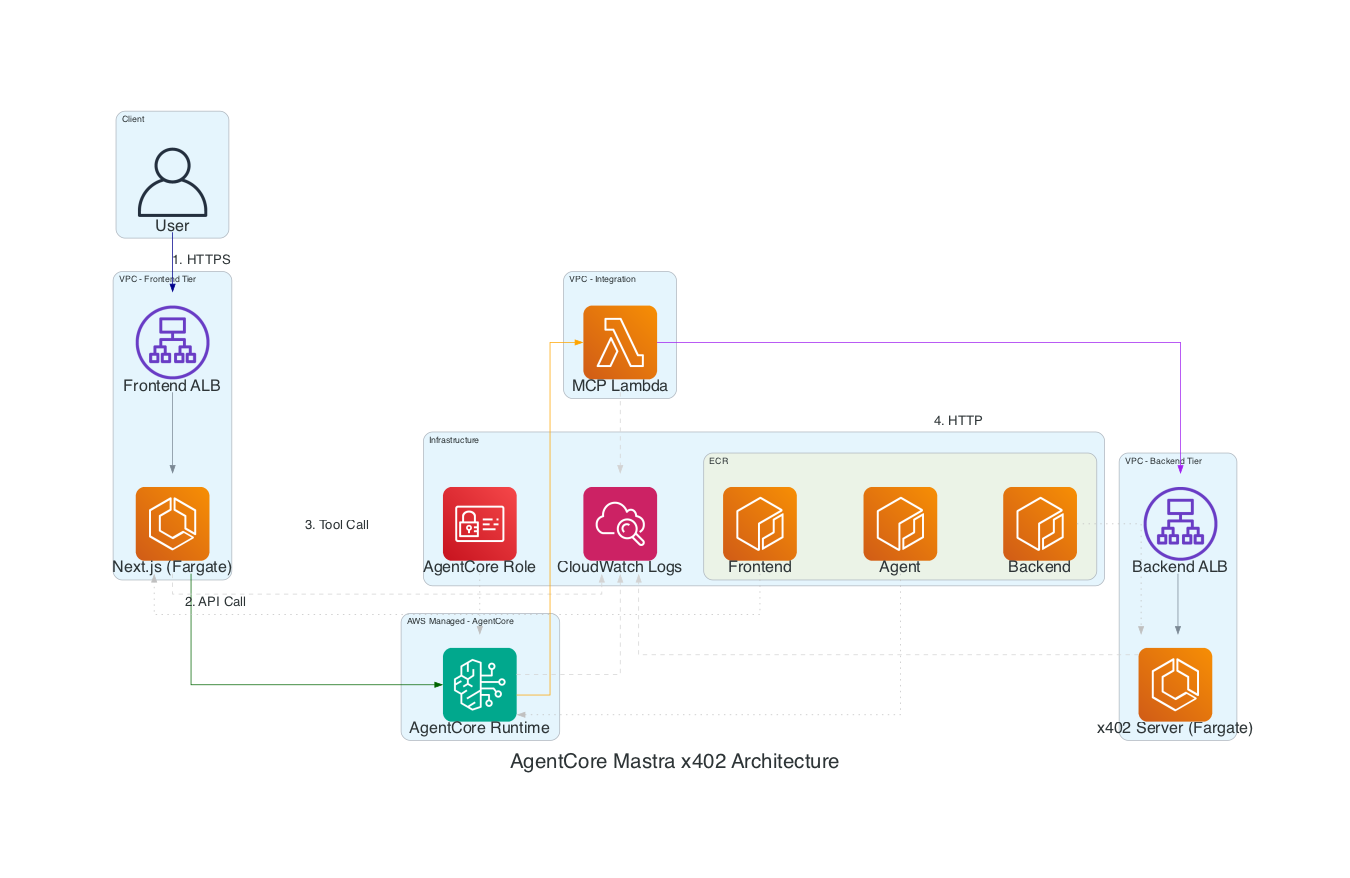
使っているAWSサービス一覧
| AWSサービス | 用途 |
|---|---|
| Amazon Bedrock AgentCore Runtime | Mastra製AIエージェントの実行基盤 |
| Amazon Bedrock | AIモデル呼び出し基盤 |
| AWS Lambda | MCPサーバーのホスティング |
| Lambda Function URL | MCPサーバーへのHTTPエントリーポイント |
| Amazon ECS on AWS Fargate | x402バックエンドとNext.jsフロントエンドのコンテナ実行基盤 |
| Application Load Balancer (ALB) | フロントエンドとx402バックエンドの公開エンドポイント |
| Amazon ECR | Mastra Agent / Frontend / x402バックエンドのコンテナイメージ管理 |
| Amazon VPC | Fargateサービスのネットワーク分離 |
| AWS Systems Manager Parameter Store | MCP Server URLやGemini API Keyなどの設定管理 |
| Amazon CloudWatch Logs | ECSおよびAgentCore Runtimeのログ収集 |
| AWS IAM | AgentCore RuntimeやFrontendからAWSリソースへアクセスするための権限管理 |
機能一覧
| 機能 | 内容 |
|---|---|
| 自然言語でのAIエージェント実行 | フロントエンドからプロンプトを送信し、AgentCore Runtime上のMastraエージェントを呼び出し |
| MCP連携 | AIエージェントがMCPサーバー経由でx402対応のリソースサーバーへアクセス |
| x402対応データ取得 | ステーブルコイン決済フローを伴うコンテンツサーバー連携のデモを実装 |
| 天気情報などの外部情報取得 | リソースサーバー経由で外部データを取得し、AIエージェント経由で要約して返却 |
| 複数モデル対応 | Amazon Bedrock系モデルとGoogle Gemini系モデルを切り替え可能な構成 |
| Web UIによる対話操作 | Next.js製フロントエンドからモデル選択、プロンプト送信、応答表示が可能 |
| ランタイム設定の外部化 | AgentCore RuntimeがParameter Storeから必要な設定を取得する構成 |
| AWS CDKによるインフラ構築 | VPC、Lambda、ECS、AgentCore Runtimeなどをコードで一括管理 |
機能ごとの処理シーケンス図
1. 自然言語でのAIエージェント実行
sequenceDiagram
  actor User as User
  participant UI as Frontend (Next.js)
  participant Action as Server Action
  participant AgentCore as Bedrock AgentCore Runtime
  participant Agent as Mastra Agent
  participant Model as LLM (Bedrock or Gemini)

  User->>UI: プロンプト入力・送信
  UI->>Action: callx402Mcp(prompt)
  Action->>AgentCore: InvokeAgentRuntimeCommand
  AgentCore->>Agent: POST /invocations
  Agent->>Model: 推論リクエスト
  Model-->>Agent: 応答生成
  Agent-->>AgentCore: JSONレスポンス返却
  AgentCore-->>Action: 推論結果返却
  Action-->>UI: 整形済みレスポンス返却
  UI-->>User: 応答表示
2. MCP連携によるx402対応データ取得
sequenceDiagram
  actor User as User
  participant UI as Frontend
  participant Agent as Mastra Agent
  participant MCP as MCP Server (Lambda)
  participant X402 as x402 Payment Interceptor
  participant Resource as Resource Server

  User->>UI: 天気などの情報取得を依頼
  UI->>Agent: プロンプト送信
  Agent->>MCP: get-data-from-resource-server ツール実行
  MCP->>X402: 支払い付きHTTPリクエスト作成
  X402->>Resource: GET /weather
  Resource-->>X402: 支払い確認後にデータ返却
  X402-->>MCP: レスポンス返却
  MCP-->>Agent: JSONデータ返却
  Agent-->>UI: 日本語で要約・整形して返却
  UI-->>User: 結果表示
3. AgentCore Runtime 起動時の設定ロード
sequenceDiagram
  participant Runtime as AgentCore Runtime
  participant Server as Mastra Agent Server
  participant SSM as SSM Parameter Store
  participant MCP as MCP Server URL
  participant Gemini as Gemini API Key

  Runtime->>Server: コンテナ起動
  Server->>SSM: /agentcore/mastra/mcp-server-url を取得
  SSM-->>Server: MCP Server URL
  Server->>SSM: /agentcore/mastra/gemini-api-key を取得
  SSM-->>Server: Gemini API Key
  Server->>MCP: MCP接続テスト
  Server->>Server: createx402Agent() でツール初期化
  Note over Server,Gemini: 取得済み設定を環境変数として利用
  Server-->>Runtime: /ping, /invocations を提供開始
4. 複数モデル対応の推論分岐
sequenceDiagram
  actor User as User
  participant UI as Frontend
  participant Runtime as AgentCore Runtime
  participant Agent as Mastra Agent
  participant Selector as Model Selector
  participant Bedrock as Amazon Bedrock Model
  participant Gemini as Google Gemini Model

  User->>UI: モデルを選択して問い合わせ
  UI->>Runtime: AgentCore Runtime呼び出し
  Runtime->>Agent: 推論依頼
  Agent->>Selector: useGemini設定を確認
  alt Geminiを利用する場合
    Selector->>Gemini: gemini-2.0-flash を呼び出し
    Gemini-->>Agent: 推論結果
  else Bedrockを利用する場合
    Selector->>Bedrock: Claude 3.5 Sonnet v2 を呼び出し
    Bedrock-->>Agent: 推論結果
  end
  Agent-->>Runtime: 応答返却
  Runtime-->>UI: レスポンス返却
  UI-->>User: 結果表示
設定管理
Mastra Agent (AgentCore Runtime)
AWS Systems Manager Parameter Storeを使用して実行時の設定を取得:
1. MCP Server URL
- パラメータ名:
/agentcore/mastra/mcp-server-url - 値: MCP Server Function URL (デプロイ時に自動設定)
- 用途: AgentCore RuntimeコンテナがMCPサーバーと通信するためのURL
2. Google Gemini API Key
- パラメータ名:
/agentcore/mastra/gemini-api-key - 値: Google Generative AI API Key (手動設定が必要)
- 用途: Geminiモデルを使用する際の認証
- 設定方法:
aws ssm put-parameter \
  --name /agentcore/mastra/gemini-api-key \
  --value "YOUR_GOOGLE_API_KEY" \
  --type SecureString \
  --region ap-northeast-1
Frontend (Next.js)
AWS SDK for BedrockAgentCoreを使用してAgentCore Runtimeを呼び出し:
- 環境変数:
AGENTCORE_RUNTIME_ARN - 形式:
arn:aws:bedrock-agentcore:{region}:{account}:runtime/{runtime-id}/runtime-endpoint/DEFAULT - 用途: フロントエンドがAgentCore RuntimeのInvokeAgentRuntimeCommand APIを呼び出すためのARN
- 認証: ECS TaskロールのIAM権限を使用
プロジェクト構成
pkgs/
├── mastra-agent/      # Mastra AIエージェント (AgentCore Runtime)
├── mcp/               # MCPサーバー (Lambda)
├── x402server/        # x402バックエンドサーバー (ECS Fargate)
├── frontend/          # Next.jsフロントエンド (ECS Fargate/App Runner)
└── cdk/               # AWS CDKインフラ定義
動かし方
インストール
pnpm install
ブロックチェーン用のキーペアとウォレットアドレスの生成
pnpm scripts generate:evm-keypair
ここで生成された秘密鍵は
pkgs/scripts/evm-keypair.jsonに書き出されます!
生成されたアドレスについてはブロックチェーンエクスプローラーでその詳細が確認できます。
ローカル開発
1. x402サーバーの起動
まず環境変数用のファイルをコピペする
cp ./pkgs/x402server/.env.example ./pkgs/x402server/.env
pnpm x402server dev
起動後 test.httpを使って稼働確認してもOK!GETメソッド(署名データ無し)でアクセスすると402エラーが返ってくるはず!!
2. MCPのビルド
pnpm mcp build
3. Mastra AIエージェントの起動
pnpm mastra-agent dev
4. フロントエンドの起動
pnpm frontend dev
AWSへのデプロイ
0. 事前準備(フロントエンド用コンテナイメージのプッシュ)
AWS CLIで認証済みであることが必要です!
CDKスタックを更新したことでこのステップは不要になりました。
ECRリポジトリ
agentcore-mastra-agent/agentcore-mastra-frontendはCDKスタックで自動作成されます。 そのため、手動での ECR create-repository は不要です。Mastra Agent側はCDKのDockerImageAssetでビルドされるため、手動ビルド・手動pushは不要です。
Dockerイメージのビルドとプッシュ
export AWS_ACCOUNT_ID=$(aws sts get-caller-identity --query Account --output text)

# ECRログイン
aws ecr get-login-password --region ap-northeast-1 | \
  docker login --username AWS --password-stdin $AWS_ACCOUNT_ID.dkr.ecr.ap-northeast-1.amazonaws.com

# linux/amd64プラットフォーム向けにビルド (Fargate x86_64用)
pnpm frontend run docker:build

# mastra-frontend:latest というDockerイメージができていたらOK!
docker image ls

# タグ付け(CDKデプロイ後)
docker tag mastra-frontend:latest $AWS_ACCOUNT_ID.dkr.ecr.ap-northeast-1.amazonaws.com/agentcore-mastra-frontend:latest

# プッシュ
docker push $AWS_ACCOUNT_ID.dkr.ecr.ap-northeast-1.amazonaws.com/agentcore-mastra-frontend:latest
1. 環境変数のセット
cp ./pkgs/cdk/.env.example ./pkgs/cdk/.env
以下の値は上述のスクリプトで生成したものを設定してください。
PRIVATE_KEY=
これ加えてGOOGLE_GENERATIVE_AI_API_KEYの値をGoogle AI Stuidoから取得する必要あります!
GOOGLE_GENERATIVE_AI_API_KEY=
環境変数が正しくセットされていないとCDKコマンド実行時にエラーが発生します!
2. MCPサーバーとx402バックエンドをデプロイ
# MCPをビルド(Lambda用)
pnpm mcp build

# 初めてCDKを使う場合は以下も実行すること
cdk bootstrap

# CDKでデプロイ
export CDK_DOCKER=/workspaces/AgentCore-Mastra-x402/docker-buildx-wrapper.sh
pnpm cdk run deploy 'AgentCoreMastraX402Stack'
デプロイが完了すると以下のリソースが出力として表示されます。
 ✅  AgentCoreMastraX402Stack

✨  Deployment time: 313.45s

Outputs:
AgentCoreMastraX402Stack.AgentCoreMastraAgentEcrRepositoryUri =
AgentCoreMastraX402Stack.AgentCoreMastraEndpointArn =
AgentCoreMastraX402Stack.AgentCoreMastraFrontendEcrRepositoryUri =
AgentCoreMastraX402Stack.AgentCoreMastraFrontendServiceLoadBalancerDNS6A45A997 =
AgentCoreMastraX402Stack.AgentCoreMastraFrontendServiceServiceURLB3967C4A =
AgentCoreMastraX402Stack.AgentCoreMastraFrontendUrl =
AgentCoreMastraX402Stack.AgentCoreMastraRuntimeArn =
AgentCoreMastraX402Stack.AgentCoreMastraRuntimeId =
AgentCoreMastraX402Stack.AgentCoreMastraRuntimeRegion =
AgentCoreMastraX402Stack.AgentCoreMastraX402BackendApiUrl =
AgentCoreMastraX402Stack.AgentCoreMastraX402BackendServiceLoadBalancerDNSA5E88881 =
AgentCoreMastraX402Stack.AgentCoreMastraX402BackendServiceServiceURL21E71FD4 =
AgentCoreMastraX402Stack.AgentCoreMastraX402GeminiApiKeyParameter =
AgentCoreMastraX402Stack.AgentCoreMastraX402MCPServerUrl =
AgentCoreMastraX402Stack.AgentCoreMastraX402MCPServerUrlParameter =
AgentCoreMastraX402Stack.AgentCoreMastraX402MCPServerUrlParameterArn =
AgentCoreMastraX402Stack.AgentCoreMastraX402VpcId =
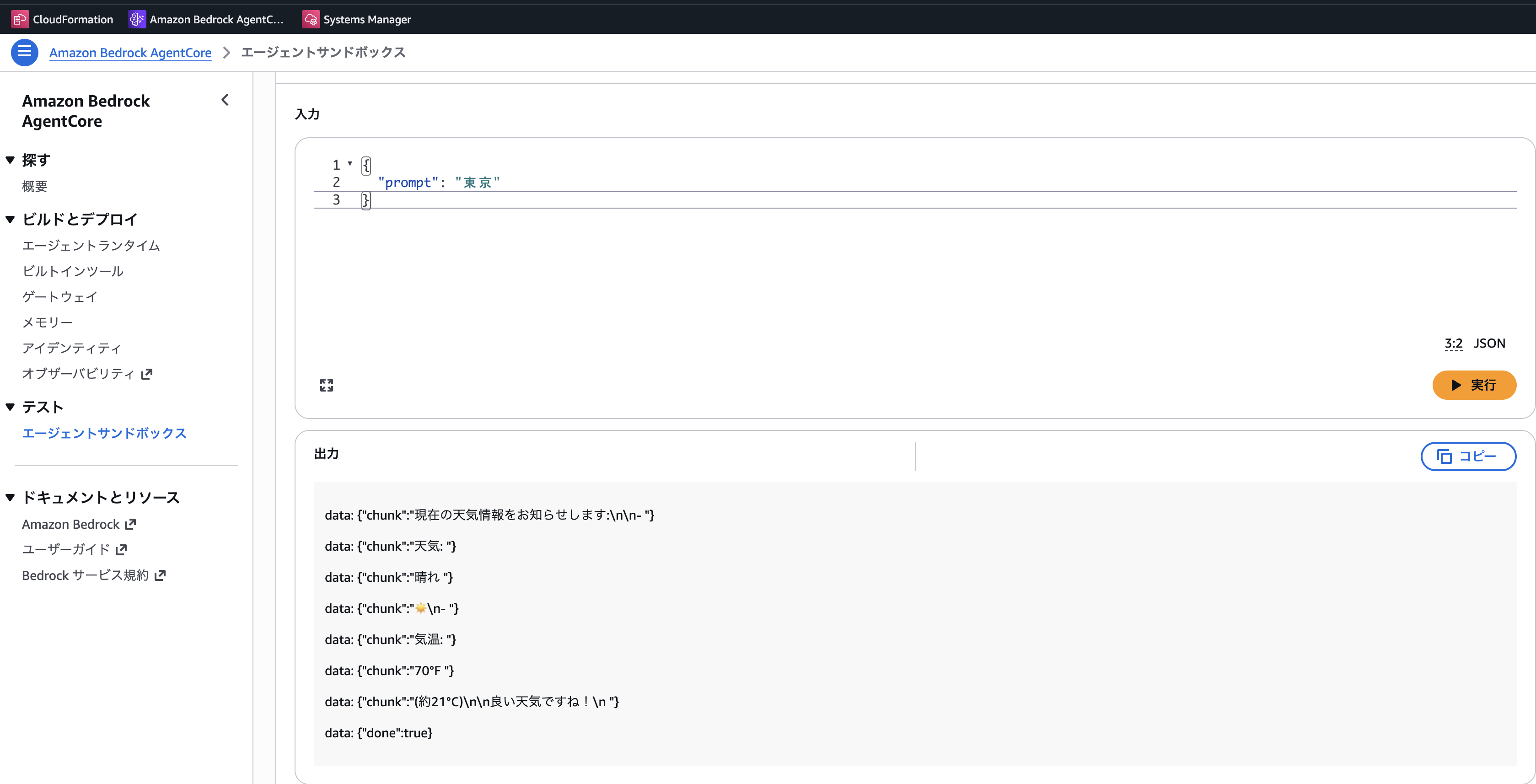
デプロイ後にAmazon Bedrock AgentCore Runtimeでテストする際のテストデータ
{
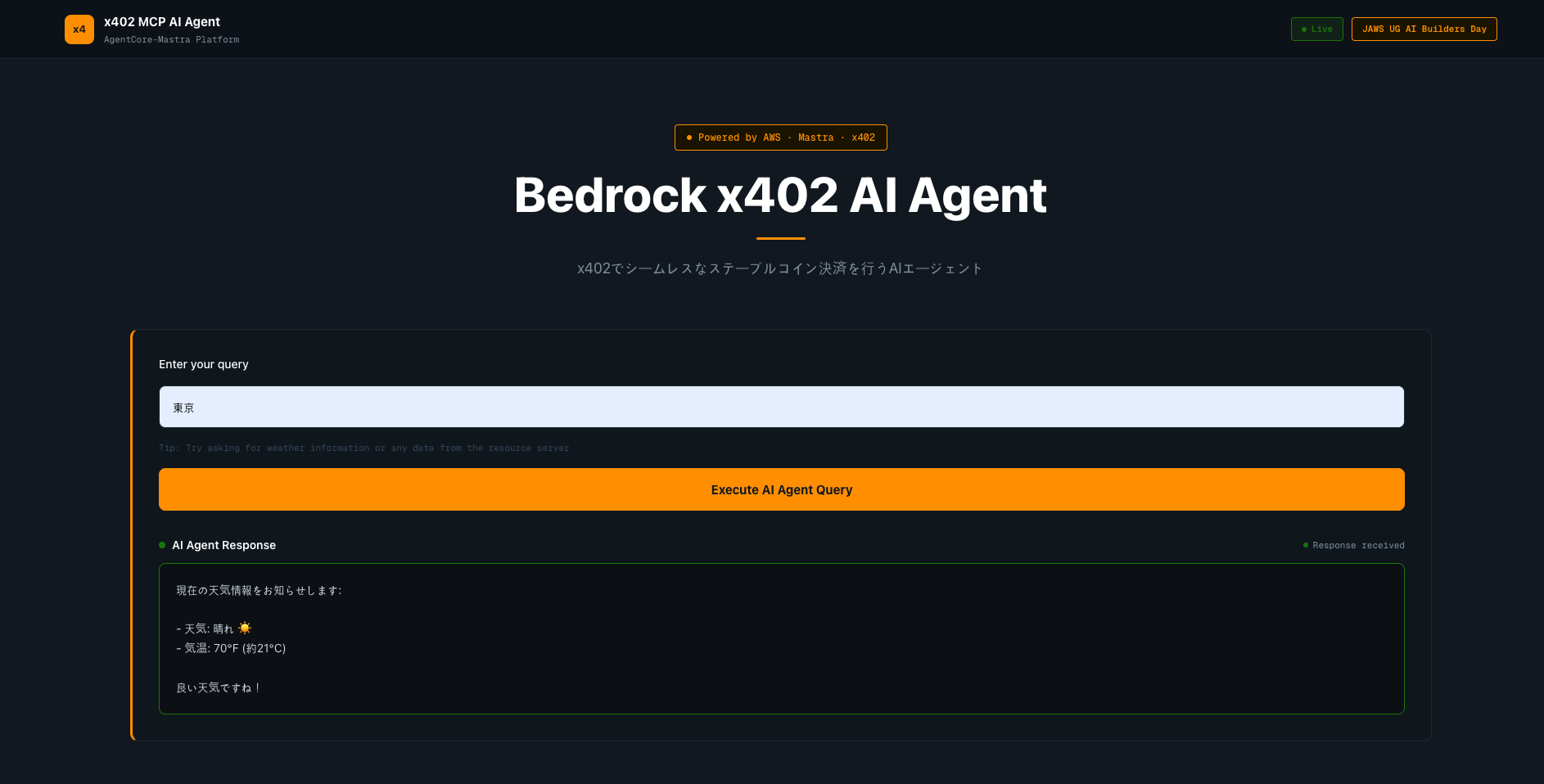
  "prompt": "東京"
}
AWSリソースを削除
pnpm cdk run destroy 'AgentCoreMastraX402Stack' --force
CI パイプライン
このプロジェクトでは、GitHub Actionsを使用したCIパイプラインを実装しています。
自動化されたワークフロー
🔍 CI Pipeline
- 実行タイミング: プルリクエスト作成時、mainブランチへのマージ時
- 実行内容:
- コード品質チェック (Biome)
- TypeScript型チェック
- 全パッケージのビルド
- ユニットテスト
- Dockerイメージビルドテスト
- セキュリティ監査
詳細は.github/workflows/ci.ymlを参照してください。
各パッケージの詳細
AgentCore Runtime サンドボックスでのテスト結果
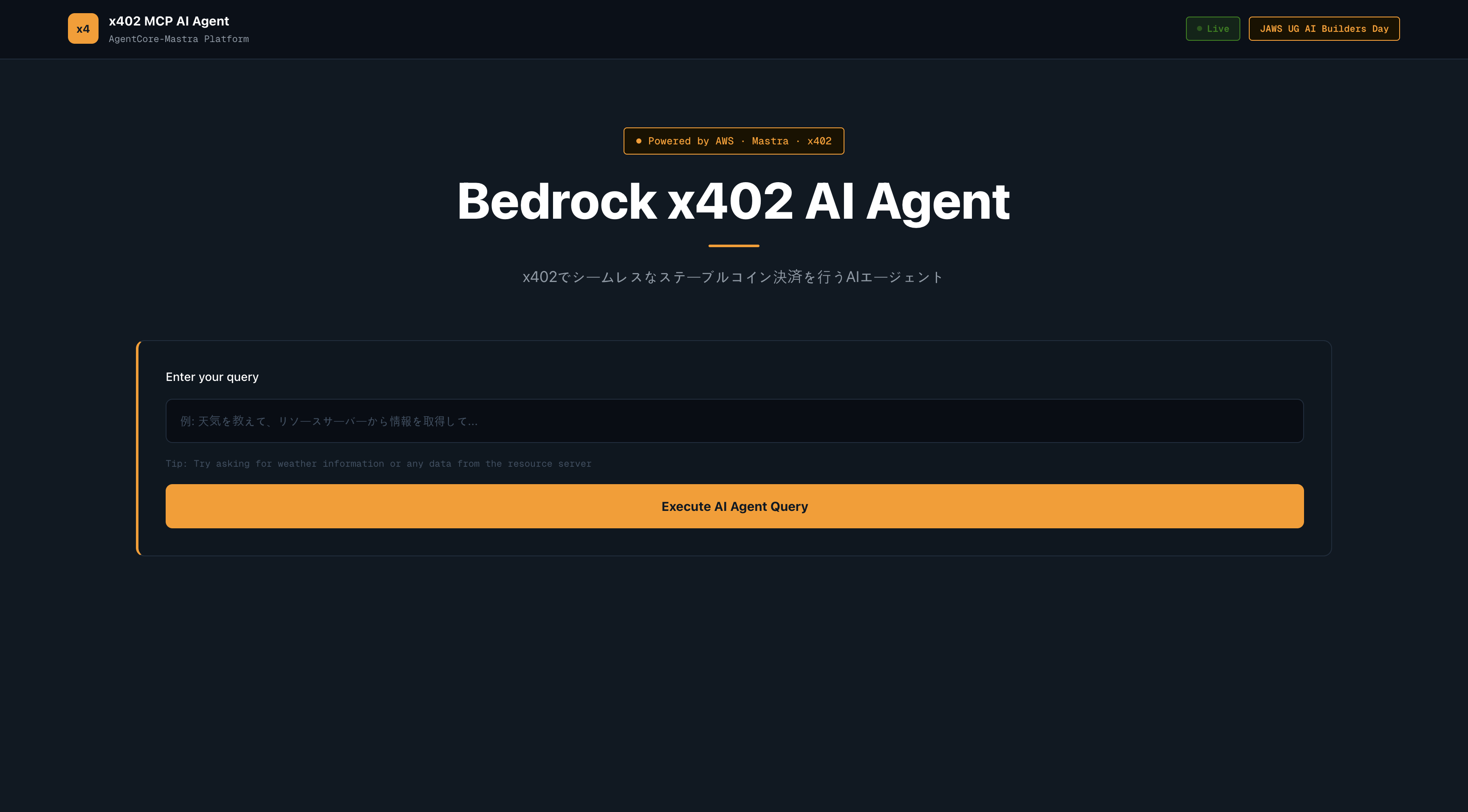
フロントエンドのイメージ
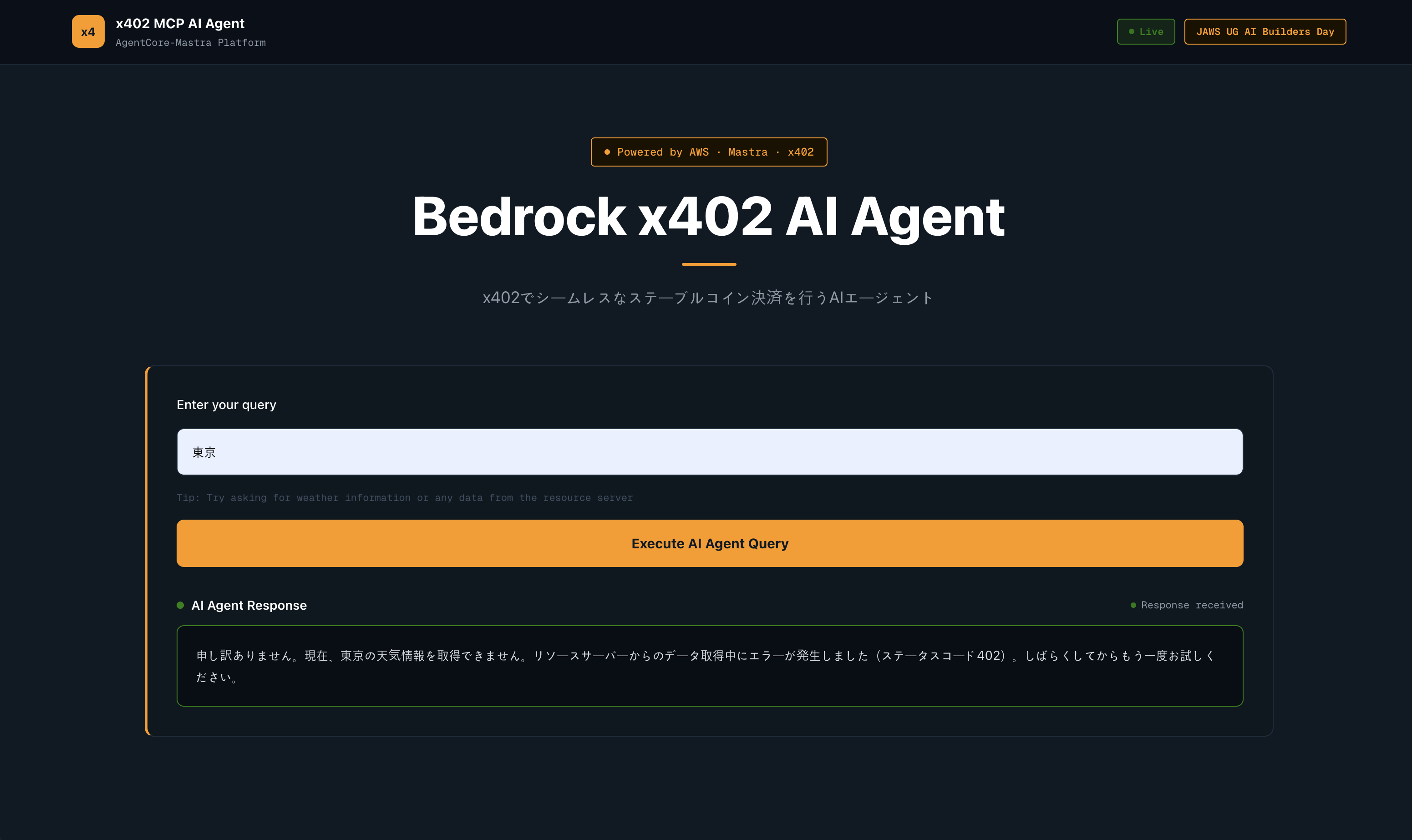
フロントエンドのイメージ(402エラーが返ってきた場合)
十分なUSDCがないウォレットの秘密鍵を設定したりすると支払いが正常に行われず402エラーが返ってきます。
フロントエンドのイメージ(正常版)
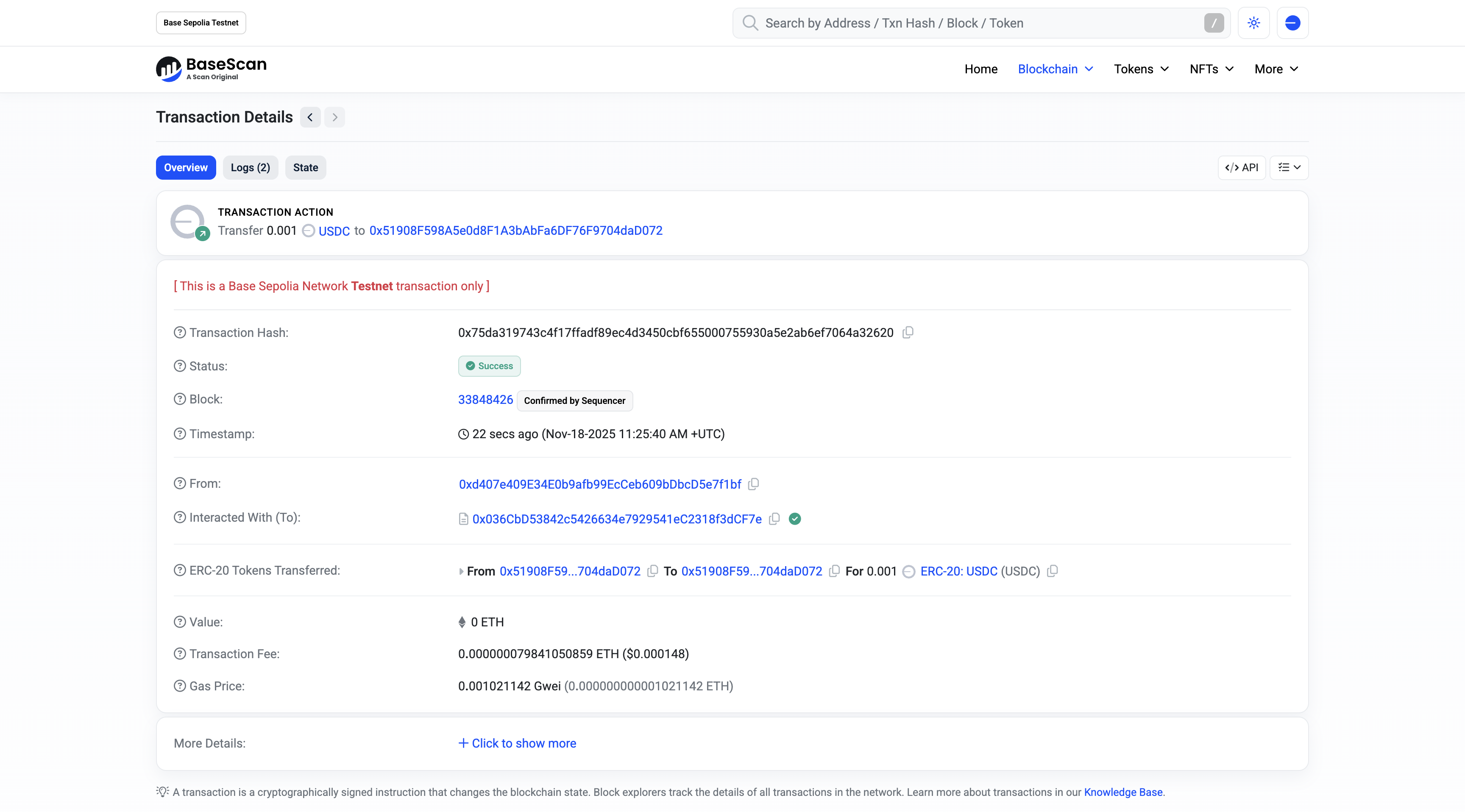
ステーブルコイン決済履歴
参考文献
More Python projects
All Python libraries →


The living ecosystem where AI agents complete tasks through workflow loops, improve through iterative execution, are evaluated by mentor agents or humans in the loop, and turn completed work into reusable work experience and data to improve future agents.


The living ecosystem where AI agents complete tasks through workflow loops, improve through iterative execution, are evaluated by mentor agents or humans in the loop, and turn completed work into reusable work experience and data to improve future agents.


Self-healing infrastructure for AI agent payments. 90.3% auto-recovery.


The first agentic payment network: policy-controlled, gasless, and real money-ready. OmniClaw CLI + Financial Policy Engine let autonomous agents pay and earn safely at machine speed.


The A2A x402 Extension brings cryptocurrency payments to the Agent-to-Agent (A2A) protocol, enabling agents to monetize their services through on-chain payments. This extension revives the spirit of HTTP 402 "Payment Required" for the decentralized agent ecosystem.


DePIN for Vintage Hardware — Proof-of-Antiquity blockchain where old machines outmine new ones. AI-powered hardware fingerprinting, 15+ CPU architectures, Solana bridge (wRTC). $0 VC.
