
ai-agent-friendly-sdk
SDK that automatically converts your pages into AI-optimized, Polish-translated Markdown for LLM agents. Features smart caching, and auto-generation of llms.txt and robots.txt configurations to make your site "agent-ready" instantly.
In the AI payments ecosystem
ai-agent-friendly-sdk is an early-stage TypeScript project in the AI payments / x402 ecosystem, focused on ai, ai-agents, ai-sdk, api. It currently has 1 GitHub stars and 0 forks, and sits alongside related tools like ClawRouter, ClawRouter, claw-empire, a2a, x402, x402Nano-API.



A generic SDK for Next.js, Remix, Vue, Svelte, or any web framework developers to generate AI-agent optimized content structure (MD format), translated to Polish (optimized for LLM understanding), from existing pages.
It works by connecting to your local or staging server (HTTP), cleaning the HTML, utilizing Google Gemini 3.0 Pro to enhance the semantics, and saving the results as static Markdown files.
Features
- Fetch & Clean: Crawls specified pages and strips non-essential HTML.
- Translate & Optimize: Uses Google Gemini (v3.0-pro) to convert content to high-quality Polish Markdown.
- Caching: Hashes content to avoid redundant API calls.
- Metadata: Generates
llms.txtandrobots.txtsnippets.
Why Use This?
- Token Optimization: Strips 70-90% of raw HTML (navs, footers, scripts), drastically reducing context window usage for agents.
- Enhanced Reasoning: Converts content to Polish, which research suggests improves LLM reasoning and internal representation (see References).
- Semantically Dense: Returns pure Markdown, making it easier for agents to parse structure and keys without HTML noise.
- Agent Discovery: Auto-generates
llms.txt, the emerging standard for agent-crawlers to map your site's knowledge.
Architecture
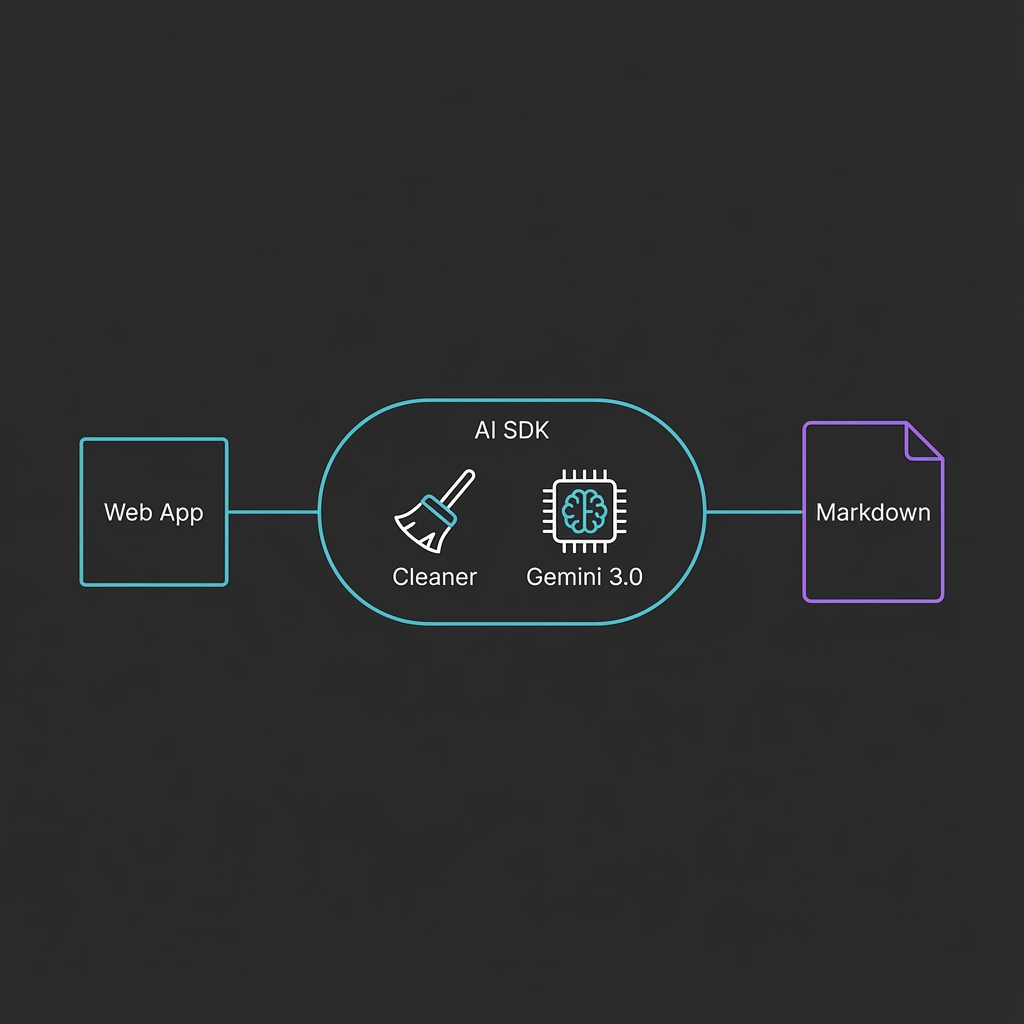
# Run directly without installing
npx jsr run @kyolt/ai-friendly-sdk init

# Or install to your project
npx jsr add @kyolt/ai-friendly-sdk
Quick Start
Initialize (Creates
ai-sdk.config.js):npx jsr run @kyolt/ai-friendly-sdk initConfigure:
- Open
ai-sdk.config.jsand set yourbaseUrlandpages. - Ensure
GEMINI_API_KEYis in your.envfile.
- Open
Build:
npx jsr run @kyolt/ai-friendly-sdk build
Configuration
Create ai-sdk.config.js in your project root:
module.exports = {
  baseUrl: 'http://localhost:3000', // URL of your running app
  pages: ['/about', '/docs', '/pricing'],
  outputDir: './public/ai',
  geminiApiKey: process.env.GEMINI_API_KEY // or set in .env
};
Usage
- Start your local Web App (e.g.,
npm run devin Next.js, Remix, etc). - Run the SDK:
# If installed globally or linked
npx ai-sdk build

# Or via local script
node dist/cli.js build
Check Output:
public/
├── llms.txt          # Agent discovery map
├── ai/
│   ├── about.md      # Cleaned & Translated content
│   ├── docs.md
│   └── pricing.md
Data Level
graph TD
    CLI[CLI Entry Point] -->|Load| Config[Config Loader]
    Config -->|Settings| Main[Main Loop]

    subgraph Core Logic
        Main -->|URL| Fetcher[Fetcher Module]
        Fetcher -->|HTML| Cache{Cache Check}

        Cache -->|Hit| Generator[Generator Module]
        Cache -->|Miss| Processor[Processor Module]

        Processor -->|Clean HTML| Cheerio[Cheerio Parser]
        Cheerio -->|Cleaned Text| Gemini[Google Gemini 3.0 Pro]
        Gemini -->|Polish Markdown| CacheStore[Update Cache]
        CacheStore --> Generator
    end

    subgraph Output
        Generator -->|Save| MD[public/ai/*.md]
        Generator -->|Generate| LLMS[public/llms.txt]
        Generator -->|Snippet| Robots[Robots.txt Log]
    end
Architecture Notes
- Models: Currently defaults to
gemini-3.0-profor stability. - Caching: Stored in
.next/cache/ai-sdk/. Delete this folder to force regeneration.
References
This project is based on research and guidelines for optimizing websites for AI agents:
Similar projects


The agent-native LLM router for autonomous agents. 55+ models (8 free), <1ms local routing, USDC payments on Base & Solana via x402.


⚡ Route requests to the most cost-effective model with ClawRouter—one wallet, over 30 models, no API keys needed.


Manage AI agent teams locally using CLI, OAuth, and API tools to simulate a virtual company with autonomous workflows.


🌐 Build seamless Agent-to-Agent communication with the A2A framework, offering real-time interactions and cross-platform support in TypeScript.


💸 Simplify payments with x402, an open protocol for fast, fee-free digital dollar transactions. Experience seamless integration and instant settlements.


💳 Streamline your Nano cryptocurrency transactions with our flexible payment gateway API, designed for easy wallet management and transaction handling.

More LLM projects
All LLM projects →


The living ecosystem where AI agents complete tasks through workflow loops, improve through iterative execution, are evaluated by mentor agents or humans in the loop, and turn completed work into reusable work experience and data to improve future agents.


Self-healing infrastructure for AI agent payments. 90.3% auto-recovery.

The AI agent with a wallet — spends USDC autonomously to get real work done. Apache-2.0, TypeScript.

Daydreams is a set of tools for building agents for commerce

Live data for AI agents — search, research, markets, crypto, X/Twitter. Pay-per-call via x402 micropayments.


DePIN for Vintage Hardware — Proof-of-Antiquity blockchain where old machines outmine new ones. AI-powered hardware fingerprinting, 15+ CPU architectures, Solana bridge (wRTC). $0 VC.
